Prompt template

IT careers infographic for the software development life cycle

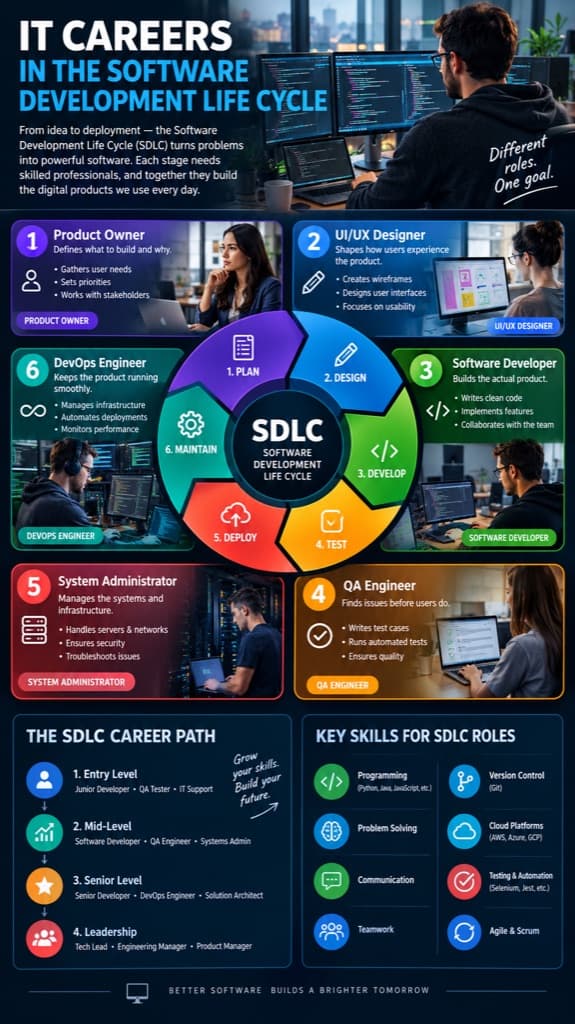
This prompt is a single sentence: it asks for a very detailed infographic about IT careers connected to the software development life cycle (SDLC). We generated our example in a tall 9:16 format. Because it names no roles, facts or colors, the model decides the structure. Our example came back as a dark poster with a six-stage SDLC wheel in the middle (plan, design, develop, test, deploy, maintain) surrounded by six role cards: product owner, UI/UX designer, software developer, QA engineer, system administrator and DevOps engineer, each with a photo and three short duties. Below the wheel it added a four-step career path from entry level to leadership and a panel of key skills such as programming, version control, cloud platforms and Agile. Use it as a starting point for a career talk, a bootcamp handout or a recruiting post, then check every line of text before you share it.
Aspect ratio 9:16No reference image needed
Dark IT careers poster with a six-stage SDLC wheel, six role cards with photos, a career path ladder and a key skills panel
Example created on Nano Banana Pro with GPT Image 2. Your inputs and settings can produce a different result.

Template prompt

Copy the prompt into the image generator and replace the details in brackets with your own.

Create a very high-detail infographic image that describes IT careers or IT jobs related to the Software Development Life Cycle.

Prompt idea by @ThanunchaiTpk. View the original post

What it is good for

  • A handout for a school or university talk about software careers
  • A visual overview for coding bootcamp students choosing a track
  • A recruiting or employer-branding post that explains who does what in a software team
  • An onboarding slide that shows new hires how roles connect across the SDLC

Prompt tips

  • Name the roles you want, such as security engineer or data engineer, if the six roles in our example do not match your team
  • Add a language instruction, for example labels in English and Thai, if your audience reads another language
  • Read every duty and skill on the poster; the model writes them itself and they may not match how your organization works
  • Keep the 9:16 ratio for phone screens and stories, or ask for a wider layout for slides
  • Zoom in on the smallest text, such as the skill examples, and regenerate if any word is misspelled