Prompt template

Design system presentation board with tokens, type and components

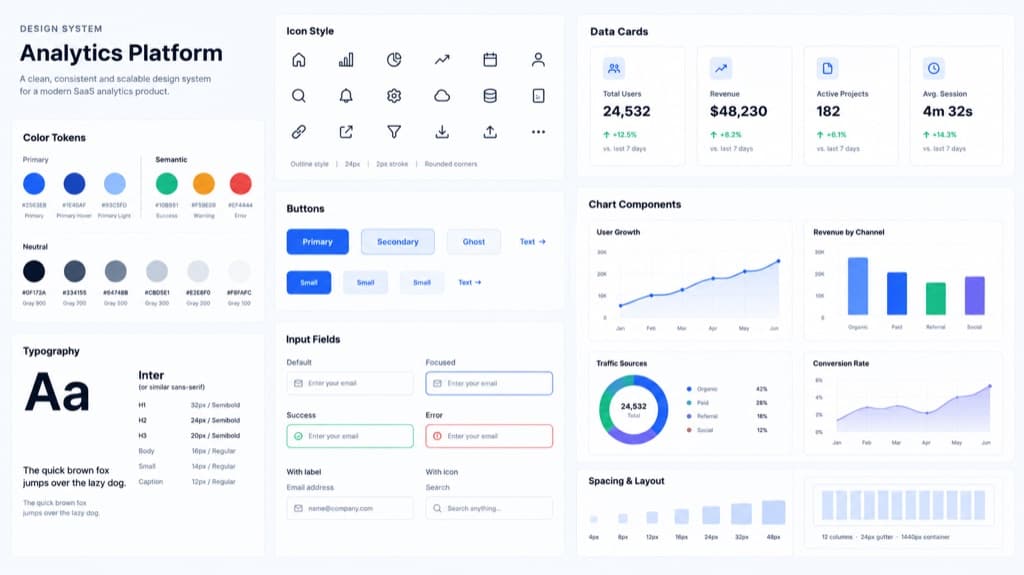
This prompt asks for one presentation board that summarizes a design system for a product you name, by default a modern SaaS analytics platform. It lists the sections to include: color tokens, typography samples, icon style, buttons, input fields, data cards, chart components and spacing examples, and it rules out tiny text, overlapping cards, random gradients and fake brand logos. Our example came back as a clean board with labeled primary, semantic and neutral swatches, a type scale, an outline icon set, button and input states, KPI cards, four chart types and a spacing scale. Use it to pitch a visual direction, open a design review, or show a style guide at a glance in a deck or case study.

Aspect ratio 16:9No reference image needed
Design system board for an analytics platform with color swatches, a type scale, outline icons, buttons, input states, data cards, charts and spacing
Example created on Nano Banana Pro with GPT Image 2. Your inputs and settings can produce a different result.

Template prompt

Copy the prompt into the image generator and replace the details in brackets with your own.

Create a design system presentation board for [a modern SaaS analytics platform]. Include color tokens, typography samples, icon style, buttons, input fields, data cards, chart components, and spacing examples. Style: clean professional Figma-like board, precise alignment, readable labels, and consistent component proportions. Restrictions: no unreadable tiny text, no overlapping cards, no random gradients, no fake brand logos, no inconsistent UI styles.

Prompt idea by github.com. View the original post
What it is good for

  • Pitching a visual direction for a new product before building components
  • Cover images for design system documentation or a case study
  • Kick-off slides for a design review with engineers and product managers
  • Comparing two or three style directions side by side

Prompt tips

  • Replace the bracketed product with your own, such as a banking app or a booking tool
  • Add a palette or font name if you already have one; otherwise the model picks its own
  • Keep the restrictions line to guide the layout and discourage invented logos, then check the result
  • Treat hex codes and sizes on the board as suggestions and check them before reusing them
  • Remove sections you do not need, such as charts, to give the rest more space