Prompt template

Desktop SaaS operations dashboard mockup with KPI cards and charts

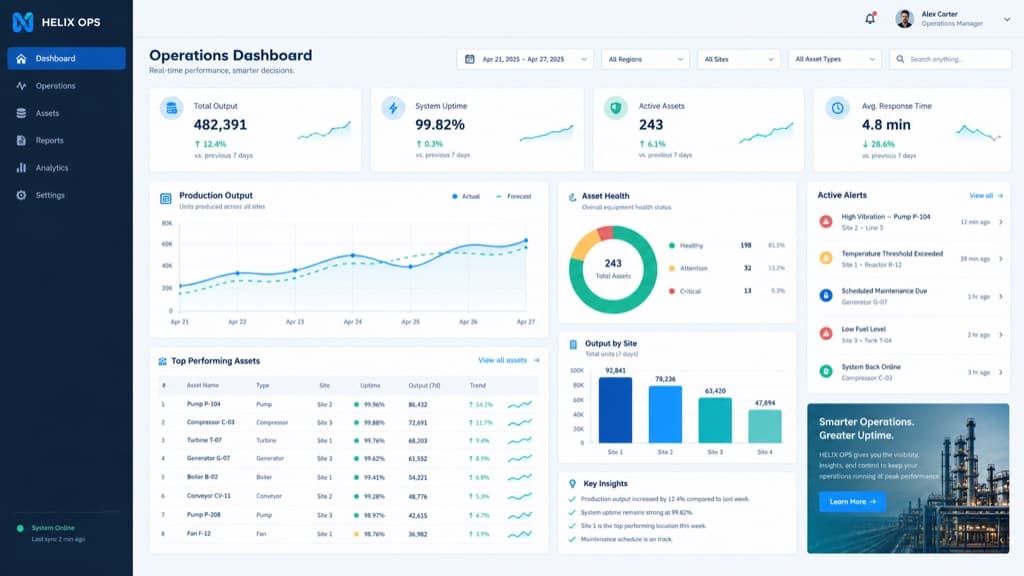
This prompt describes a complete desktop dashboard screen for a fictional operations platform called HELIX OPS: a left sidebar, a top filter bar, a row of KPI cards, line charts, a data table and an alert panel, in a cool slate, cobalt, teal and white palette on a tight grid. Our example came back as a believable operations dashboard with readable labels, sparklines in each KPI card, a donut chart for asset health, a bar chart per site and a list of active alerts. Use it to picture a product before design work starts, to fill a landing page or pitch deck with a realistic screen, or to explore layout and color for an internal tool. Swap the product name, palette and panel list to fit your own product.

Aspect ratio 16:9No reference image needed
Desktop operations dashboard named HELIX OPS with a dark sidebar, four KPI cards, a line chart, a donut chart, a bar chart, an asset table and an alerts list
Example created on Nano Banana Pro with GPT Image 2. Your inputs and settings can produce a different result.

Template prompt

Copy the prompt into the image generator and replace the details in brackets with your own.

Create a high-end desktop SaaS analytics dashboard mockup for a fictional platform named HELIX OPS, displayed on a 16:10 monitor canvas. Use a cool palette of slate, cobalt blue, teal, pale gray, and white, with tight grid alignment. Include a left sidebar, top filter bar, KPI cards, line charts, data table, alert panel, crisp typography, realistic labels, and production-ready spacing.

Prompt idea by github.com. View the original post
What it is good for

  • Hero and feature images for a SaaS landing page before the real UI exists
  • Pitch deck slides that show what a product could look like
  • Early layout and color exploration for an internal operations tool
  • Reference screens for a designer starting a dashboard in Figma

Prompt tips

  • Replace HELIX OPS with your own product name and keep it short so the logo text stays clean
  • List the panels in the order you want, then check the generated screen for the requested names and layout
  • Name the palette in plain colors such as slate, cobalt and teal rather than hex codes
  • Check numbers, dates and labels before publishing; they are invented and may not add up
  • Generated screens are pictures, not working code; rebuild the layout in your design tool