Prompt template

Laptop UI/UX mockup on a wooden desk in daylight

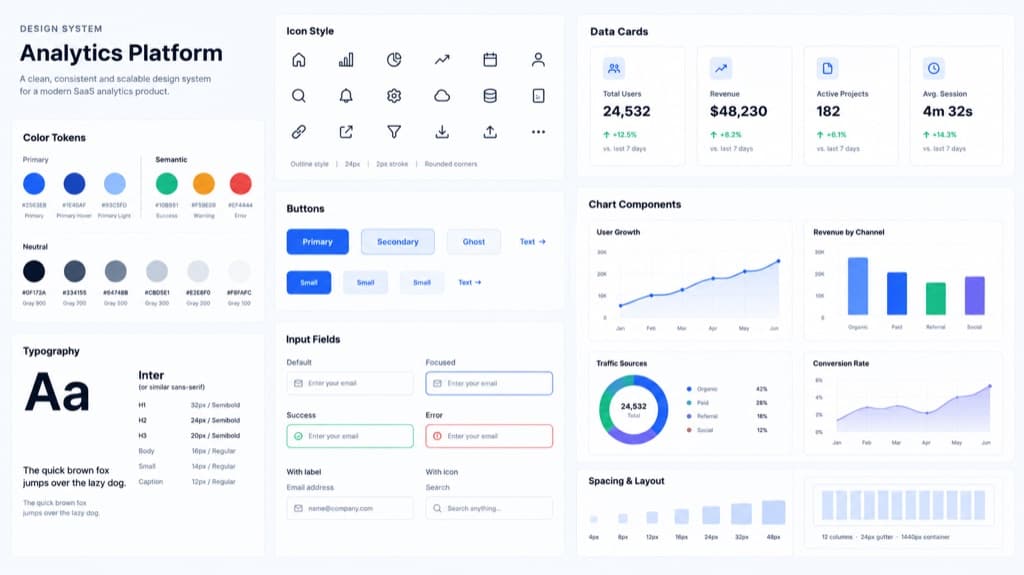
This prompt asks for a hyper-realistic scene: a slim modern laptop on a minimal wooden desk in soft daylight, with a crisp interface on its screen. By default the screen shows a clean SaaS dashboard with sidebar navigation, charts, tables, elegant typography and realistic labels, and the prompt rules out unreadable UI, broken charts, overlapping elements and fake third-party logos. Our example came back as a silver laptop beside a potted plant, a notebook with a pen and a mug on a cork coaster. On screen is a light project dashboard for an invented app called Flowdesk, with four stat cards, a line chart of project progress, a donut chart of task status and a table of recent projects. The app name, user name and numbers are all made up by the model, so use the image as a concept or presentation visual, not as a picture of a real product.

Aspect ratio 16:9No reference image needed
Silver laptop on a wooden desk with a plant and mug, its screen showing a light project dashboard with stat cards, charts and a table
Example created on Nano Banana Pro with GPT Image 2. Your inputs and settings can produce a different result.

Template prompt

Copy the prompt into the image generator and replace the details in brackets with your own.

Create a hyper-realistic UI/UX mockup displayed on a slim modern laptop placed on a minimal wooden desk with soft natural daylight. The screen shows [a clean SaaS dashboard] with elegant typography, glassmorphism cards if appropriate, neatly spaced components, sidebar navigation, charts, tables, and realistic labels. Style: photorealistic product photography plus crisp interface design. Restrictions: no unreadable UI, no broken charts, no overlapping elements, no fake third-party logos.

Prompt idea by github.com. View the original post
What it is good for

  • A hero image for a landing page before real screenshots exist
  • A slide in a pitch deck that shows the product idea in context
  • A cover image for a UI/UX portfolio case study
  • A visual brief that shows a developer the dashboard style you want

Prompt tips

  • Replace the bracketed screen content with your own idea, such as a CRM, a finance app or an analytics tool
  • Give the app name, menu items and key numbers in quotes so the screen matches your story
  • Check that any invented app name is not someone else's product before you publish
  • Describe the desk and props, such as a dark walnut desk or a home office, to match your brand
  • Zoom in on charts and tables; regenerate if numbers or labels look broken